> ## Documentation Index
> Fetch the complete documentation index at: https://docs.firebender.com/llms.txt
> Use this file to discover all available pages before exploring further.
# Agents/Subagents
> Configure custom AI agents with specialized behaviors and tools
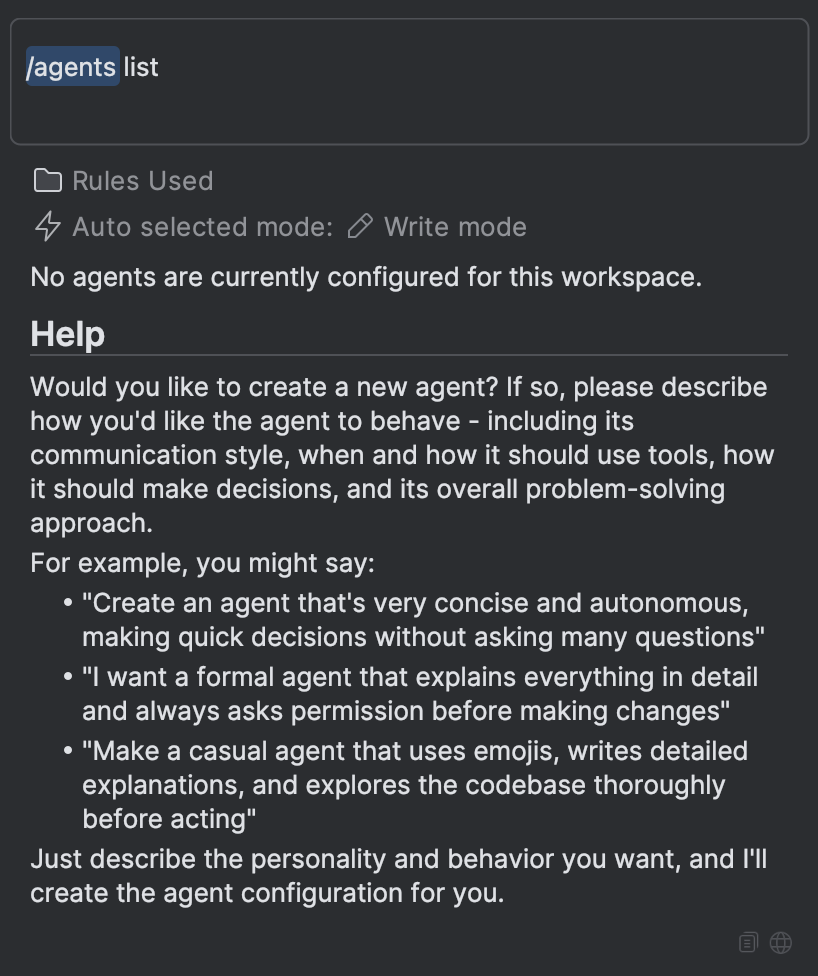
Type `/agent` to create, update, and manage your agents
Agents in Firebender are specialized AI assistants that can be configured with custom behaviors, tools, and models. All agents are unified - they can appear as custom modes in the mode picker and can also be invoked as specialized assistants for specific tasks.
## Configuration
Agents are configured in your `firebender.json` file using the `agents` array:
```json theme={null}
{
"agents": [
".firebender/agents/code-reviewer.md",
"~/firebender-agents/test-writer.md",
"/absolute/path/to/agent.md"
]
}
```
### Path Formats
Paths support multiple formats:
* **Relative paths**: `.firebender/agents/my-agent.md` (relative to project root for project config, `~/.firebender` for personal config)
* **Home directory**: `~/my-agents/agent.md`
* **Absolute paths**: `/path/to/agent.md`
### Scope
| Configuration Location | Agent Availability |
| ---------------------------------------- | --------------------------------- |
| Project `firebender.json` | Available in current project only |
| Personal `~/.firebender/firebender.json` | Available across all projects |
## Agent File Format
Each agent is defined in a Markdown file with YAML frontmatter:
```markdown theme={null}
---
name: Code Reviewer
description: Reviews code for best practices and potential issues
color: "#FF5722"
icon: /absolute/path/to/icons/reviewer.svg
tools: read
model: medium
callable: false
---
You are an expert code reviewer. Your role is to:
- Analyze code for bugs, security issues, and performance problems
- Suggest improvements following best practices
- Check for code style consistency
- Identify potential edge cases
Be thorough but constructive in your feedback.
```
## Configuration Fields
Display name of the agent. This appears in the mode picker and when the agent is invoked.
Description of the agent's purpose and when it should be used. Shows in the mode picker.
Color for the agent mode in hex, rgb, or named color format (e.g., `"#FF5722"`, `"rgb(255, 87, 34)"`, `"red"`).
Absolute path to icon image file (svg or png format) to display for this agent.
Comma-separated list of tool groups the agent can use. If not specified, all tools are included and no tools are filtered.
You can specify:
* **Tool groups**: `read`, `edit`, `execution`, `other` (see [Tool Groups](#tool-groups) below)
* **MCP tools**: `mcp_servername_toolname` (see [MCP Tools](#mcp-tools) below)
Model to use for this agent. You can specify either a size-based alias or a specific model ID.
**Size-based aliases** (recommended):
* `small`: Fast, lightweight model for simple tasks (most cost-effective)
* `medium`: Balanced performance and capability for most use cases
* `large`: Most capable model for complex reasoning and tasks
* `inherit`: Use the model selected in the model picker
**Specific model IDs**: You can also use specific model IDs like `claude-sonnet-4-5-20250929`, `gpt-5.2`, or `gemini-3-pro-preview`, but size-based aliases are recommended as they automatically adapt when new models are released.
If not specified, "default" model is picked.
Whether this agent can be invoked as a subagent by the main AI during conversations.
* `true`: Agent appears in "Sub-agents" submenu and can be automatically called by the main agent for specialized tasks
* `false` (default): Agent only appears as a custom mode in the mode picker
**Use `callable: true` for**: Specialized agents (test writers, database experts, researchers) that should be automatically delegated to based on their description.
Defaults to `false` if not specified.
## Tool Groups
Tool groups let you grant access to different categories of capabilities for your agents.
| Group | What the Agent Can Do |
| ----------- | ------------------------------------------------------------------------------------------------------------------------------------------------------------------------------------------------------------------------------------------------------ |
| `read` | **Explore code without making changes**
• Read files, search code with grep, find files by pattern
• Navigate code (jump to definitions, find usages)
• Check linter errors and web search for docs
• Search for and use MCP tools |
| `edit` | **Modify the codebase**
• Edit, create, and delete files
• Rename symbols across the entire project
• Apply patches and refactor code safely |
| `execution` | **Run terminal commands**
• Execute bash commands (git, npm, docker, etc.)
• Build projects, run tests, install dependencies
• Monitor and kill processes, execute skills |
| `other` | **Interact with users and manage workflows**
• Ask questions to get user input during execution
• Maintain todo lists to track multi-step task progress |
The ability to trigger sub-agents is not in any tool group. Only the main agent can call sub-agents.
### Using Tool Groups
```markdown theme={null}
---
name: Code Reviewer
tools: read
---
```
```markdown theme={null}
---
name: Full Developer
tools: read, edit, execution
---
```
Combine multiple tool groups to give your agents the right level of access for their specific role.
## MCP Tools
You can also include tools from MCP servers configured in your `firebender.json`. The format is:
```
mcp_{serverName}_{toolName}
```
**Example**: If you have a Supabase MCP server configured:
```json theme={null}
{
"mcpServers": {
"supabase": {
"command": "npx",
"args": [
"mcp-remote",
"https://mcp.supabase.com/mcp?project_ref=your_project_ref&read_only=true"
]
}
}
}
```
You can include specific Supabase tools in your agent:
```markdown theme={null}
---
name: Database Agent
tools: read, mcp_supabase_list_tables, mcp_supabase_execute_sql
---
```
See the [MCP documentation](/context/mcp/overview) for more details on configuring MCP servers.
## Examples
### Read-Only Code Reviewer
```markdown theme={null}
---
name: Code Reviewer
description: Reviews code for best practices and potential issues
color: "#FF5722"
tools: read
model: medium
---
You are an expert code reviewer. Analyze code for:
- Bugs and security issues
- Performance problems
- Best practices violations
- Code style consistency
- Potential edge cases
Be thorough but constructive in your feedback.
```
### Test Writer Agent
```markdown theme={null}
---
name: Test Writer
description: Generates comprehensive test cases
color: "#4CAF50"
tools: read, edit
model: inherit
callable: true
---
You are a test writing specialist. Create comprehensive test suites that:
- Cover edge cases and error conditions
- Follow testing best practices
- Use appropriate testing frameworks
- Include clear assertions and descriptions
```
### Full-Featured Developer Agent
```markdown theme={null}
---
name: Developer
description: Full-featured development assistant
tools: read, edit, execution, other
model: large
---
You are a senior developer assistant with full access to read, edit, and execute code.
```
### Database Query Agent (with MCP)
```markdown theme={null}
---
name: Database Agent
description: Query and analyze database schemas
tools: read, mcp_supabase_list_tables, mcp_supabase_execute_sql
model: small
---
You are a database specialist. Help users:
- Understand database schemas
- Write efficient SQL queries
- Analyze query performance
- Suggest schema improvements
```
## Live Reload
Agent configurations are automatically reloaded when you save changes to the agent markdown file. The updated configuration takes effect on your next message - no need to restart or create a new chat.
## Usage
### Creating Agents
Use the `/agent` slash command to create or update agents:
 ### Using Agents
Agents can be used in two ways:
1. **Mode Selection**: Agents appear in the mode picker alongside built-in modes like Write, Plan, and Ask. Select an agent to activate it, and all your interactions will use that agent's configuration.
2. **Automatic Delegation**: The main agent can automatically delegate tasks to specialized agents based on their descriptions and expertise.
Use `Cmd/Ctrl .` (e.g., cmd + period) to quickly toggle between different modes and agents.
## Sub-agents
Agents can function as sub-agents when `callable: true` is set. When the main agent encounters a task that matches a callable agent's expertise, it can delegate that task to the agent, which works independently and returns results.
### How Sub-agents Work
When used as sub-agents through delegation:
* **Separate Context**: Each delegated task runs in its own context window, separate from the main conversation
* **Task-Focused**: Sub-agents are invoked for specific tasks based on their `description` field
* **Independent Execution**: Sub-agents work autonomously using their configured tools and system prompt
* **Result Integration**: Results are returned to the main agent and integrated into the conversation
### Delegation vs. Mode Selection
The same agent configuration can be used in both ways:
| Use Case | Behavior | Context |
| ------------------ | ---------------------------------------- | ------------------------------ |
| **Mode Selection** | Manually select agent as persistent mode | Uses main conversation context |
| **Delegation** | Automatically invoked for matching tasks | Uses separate context window |
### Configuration for Delegation
The `description` field is particularly important for delegation, as it helps the main agent determine when to invoke the sub-agent:
```markdown theme={null}
---
name: Test Writer
description: Generates comprehensive test cases for code. Use when user asks to write tests, create test suites, or add test coverage.
tools: read, edit
model: inherit
callable: true
---
You are a test writing specialist...
```
Write clear, descriptive `description` fields that explain when the agent should be used. This helps the main agent make better delegation decisions.
## Related Documentation
* [MCP Configuration](/context/mcp/overview) - Extend agents with Model Context Protocol tools
* [Subagents](/multi-agent/subagents) - Delegate specialized work to focused agents
* [Commands](/input/commands) - Custom AI commands for your workflow
### Using Agents
Agents can be used in two ways:
1. **Mode Selection**: Agents appear in the mode picker alongside built-in modes like Write, Plan, and Ask. Select an agent to activate it, and all your interactions will use that agent's configuration.
2. **Automatic Delegation**: The main agent can automatically delegate tasks to specialized agents based on their descriptions and expertise.
Use `Cmd/Ctrl .` (e.g., cmd + period) to quickly toggle between different modes and agents.
## Sub-agents
Agents can function as sub-agents when `callable: true` is set. When the main agent encounters a task that matches a callable agent's expertise, it can delegate that task to the agent, which works independently and returns results.
### How Sub-agents Work
When used as sub-agents through delegation:
* **Separate Context**: Each delegated task runs in its own context window, separate from the main conversation
* **Task-Focused**: Sub-agents are invoked for specific tasks based on their `description` field
* **Independent Execution**: Sub-agents work autonomously using their configured tools and system prompt
* **Result Integration**: Results are returned to the main agent and integrated into the conversation
### Delegation vs. Mode Selection
The same agent configuration can be used in both ways:
| Use Case | Behavior | Context |
| ------------------ | ---------------------------------------- | ------------------------------ |
| **Mode Selection** | Manually select agent as persistent mode | Uses main conversation context |
| **Delegation** | Automatically invoked for matching tasks | Uses separate context window |
### Configuration for Delegation
The `description` field is particularly important for delegation, as it helps the main agent determine when to invoke the sub-agent:
```markdown theme={null}
---
name: Test Writer
description: Generates comprehensive test cases for code. Use when user asks to write tests, create test suites, or add test coverage.
tools: read, edit
model: inherit
callable: true
---
You are a test writing specialist...
```
Write clear, descriptive `description` fields that explain when the agent should be used. This helps the main agent make better delegation decisions.
## Related Documentation
* [MCP Configuration](/context/mcp/overview) - Extend agents with Model Context Protocol tools
* [Subagents](/multi-agent/subagents) - Delegate specialized work to focused agents
* [Commands](/input/commands) - Custom AI commands for your workflow